Game Changer Feature

Your verified HR identity.
Built to be found. Built to impress.

LinkedIn shows your job history. NextInHR tells your full HR story. A verified profile, a shareable brand card, a personal QR code — and a public profile that ranks on Google.
Free · No credit card · Takes 5 minutes
100%
HR-specific profile fields
Public
Google-indexed profile
Verified
By employer email
QR Code
Shareable everywhere
HR Brand Card
QR Code
HR-Specific Profile Fields

LinkedIn shows your job title
NextInHR shows your HR expertise

LinkedIn was designed for all professions — so its profile fields are generic by necessity. NextInHR is built exclusively for HR, which means every field on your profile is designed to showcase what actually matters in the HR profession.

LinkedIn Profile
NextInHR Logo NextInHR Profile
Job title only
HR specialisation + sub-domain
Generic skills section
HR competency map
No team size field
Team / org size managed
No industry HR field
Industries covered as HR
No gig / consulting flag
Open to gigs / consulting
No HR cert showcase
Verified HR certifications
HR Specialisation
Your exact HR domain
Talent Acquisition, HRBP, L&D, Compensation, OD, HR Operations — showcase the specific HR area you're known for, not just a generic job title.
Talent Acquisition · Comp & Ben
Industry Experience
Industries you've worked in as HR
Specify exactly which industries your HR experience covers — Tech, FMCG, Banking, Healthcare, Manufacturing — so the right employers find you.
Tech · Fintech · FMCG
Team & Org Scale
Size of teams you've managed HR for
Tell employers and clients the scale at which you've operated — startup (1–50), scale-up (50–500), enterprise (500+) — a field that simply doesn't exist on LinkedIn.
50–200 employees
Geographic HR Experience
Regions you've managed HR across
Highlight multi-country, cross-border, or regional HR experience — a critical differentiator for HR professionals working across the Middle East, Asia, or globally.
USA · UK · Singapore · India · UAE
HR Function Coverage
Full spectrum of HR functions handled
Recruitment, onboarding, payroll, compliance, HRIS, performance management, culture — map your full HR function coverage, not just your job description.
Recruitment · Compliance · HRIS
Gig Availability
Open to consulting, gigs & freelance
Flag your availability for consulting engagements, part-time HR gigs, or project-based work — and let employers and clients contact you directly for opportunities.
Open to Gigs · Consulting
Verified Certifications
HR certifications with proof
Every NextInHR certification you complete is automatically added to your profile with a verifiable QR code — not just a self-declared skill, but a proven, verified credential.
AI-Powered Recruiter Verified
HR Achievements
Your biggest wins as an HR professional
Reduced attrition from 32% to 11%. Built the HR function from scratch. Onboarded 500 employees in one quarter. Showcase the outcomes that define your career — not just your responsibilities.
Reduced attrition by 21%
Profile Verification
How your profile gets verified step by step
1

Create your profile

Fill in your HR-specific profile fields — specialisation, industries, team scale, functions covered, and career achievements.

2

Verify current employer

Enter your current employer's professional email address. We send a one-click verification link — once confirmed, your current role gets a green verified badge.

3

Verify historical experience

Add past employers. Use your archived work email or contact your former HR/manager for verification. Every verified role gets its own timestamp and confirmation badge.

4

Get your verification badges

Verified roles appear with a distinct badge on your profile — signalling to everyone who views it that your experience is real, confirmed, and trustworthy.

5

Go public — get indexed on Google

Your verified profile is published at nextinhr.com/profile/[yourname] — a public, indexable page that Google can discover and rank for your name.

Current Employer Verified Past Experience Verified Google Indexed
Verified Profile

Trust that LinkedIn
simply cannot provide.

On LinkedIn, anyone can claim any job title, any company, any experience — with zero verification. A profile that says "HR Director at Fortune 500" could be completely unverified. For HR professionals who have genuinely earned their experience, this is a problem.

NextInHR introduces the only verification system built specifically for HR professionals — employer-verified current roles, email-confirmed historical experience, and a public profile that proves your credentials are real.

Current employer verification via professional email

Enter your work email and we verify your current role directly with your employer. Your profile shows a confirmed, timestamped verification badge.

Historical experience verification

Past roles can be verified via archived work emails or manager confirmation — giving your career history the same credibility as your current role.

Certification verification

Every NextInHR certification auto-verifies on your profile with a QR-scannable proof link — no manual entry, no self-declaration.

Public profile indexed by Google

Unlike LinkedIn profiles which are often limited in Google visibility, your NextInHR profile is fully public and optimised to rank when someone searches your name.

Set Up Your Verified Profile
NextInHR vs LinkedIn

Your profile on LinkedIn.
Your identity on NextInHR.

LinkedIn was the best option available — until now. Here's exactly what changes when you build your HR identity on a platform built exclusively for HR professionals.

LinkedIn

A powerful general professional network — but designed for every profession equally, which means designed for none of them specifically.
Generic profile visible to everyoneYour profile looks identical to a software engineer's or a sales rep's — no HR-specific fields, no HR-specific credibility signals.
No employer verification systemAnyone can claim any job at any company. There is no mechanism to confirm that experience is real.
Limited Google visibilityLinkedIn profiles appear in Google but often rank below the fold — and LinkedIn controls the SEO, not you.
No QR code for offline useThere is no way to put your LinkedIn identity on a business card, resume, or email signature as a scannable code.
No shareable brand cardLinkedIn has no equivalent of a visual, shareable identity card designed for social media posts.
Certifications are self-declaredYou can add any certification with no verification — reducing the credibility of every certificate listed.
NextInHR

A verified HR identity — built to be found, trusted, and shared everywhere you want your professional presence to be felt.

Deep HR profile — 100% HR-specific fieldsHR specialisation, industries, team scale, functions covered, geo experience, gig availability — a profile that speaks the HR profession's language.
Employer-verified current & past rolesProfessional email verification for current role. Email or manager confirmation for past roles. Every verified experience gets a timestamped badge.
Public profile — fully indexed by GoogleYour profile at nextinhr.com/profile/[yourname] is public, optimised, and structured for Google to discover and rank — putting you in control of your digital HR identity.
Personal QR code — goes everywhereOn your resume, email signature, business card, and social media posts — one scan takes anyone straight to your verified HR profile.
HR Brand Card — share on any platformA beautifully designed visual card showing your verified HR identity — post it on LinkedIn, Instagram, WhatsApp, or anywhere your audience sees you.
Certifications are verified, not self-declaredNextInHR certifications are auto-verified with QR-scannable proof — every certificate on your profile is a proven credential, not a claim.
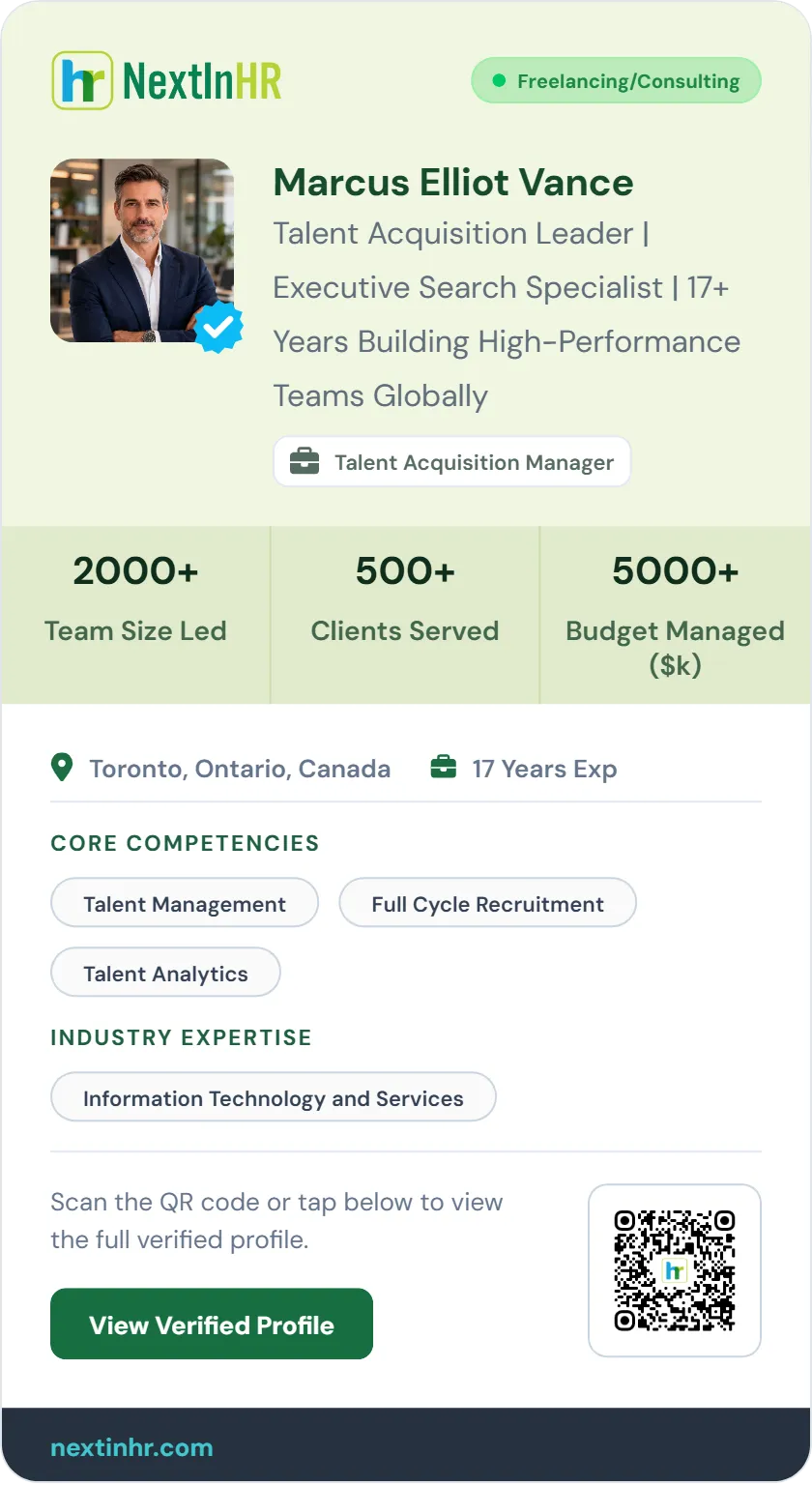
HR Brand Card

Market your expertise
everywhere you go.

Your HR Brand Card is a beautifully designed, shareable visual that distils your verified HR identity into a single, impactful asset.

Automated updates as you grow.

Google-Indexed Profile

When someone searches your name,
your NextInHR profile shows up.

LinkedIn profiles appear in Google — but LinkedIn controls how they rank, what they show, and how much of the information is visible without logging in. Your NextInHR profile is a fully public, structured page that you own — optimised to rank for your name and HR specialisation.

Imagine an employer, a potential client, or a recruiter Googling your name. Right there, on the first page — your verified HR profile. Not a generic LinkedIn page. A rich, HR-specific credential that immediately tells them exactly who you are, what you've done, and why you're the right person.

  • Fully public profile page at nextinhr.com/profile/[yourname]
  • Structured with schema markup so Google understands and ranks it correctly
  • Your name, HR specialisation, certifications, and verified experience all indexed
  • Ranks for "HR professional [your name]" and "[your specialisation] HR [your city]"
  • Updated automatically as you add certifications and verified experience
  • No login required to view — fully accessible to anyone who finds it
Create Your Public HR Profile
Samira Rajan HR professional Dubai
About 4,200 results (0.42 seconds)
Top Result
N
nextinhr.com/profile/samira-rajan
Samira Rajan — Verified HR Professional | NextInHR
Senior HR Business Partner · Talent Acquisition · 11 years experience · Dubai, UAE. Verified by TechCorp Inc. Certified AI-Powered Recruiter. View full HR profile, certifications, and connect →
linkedin.com/in/samira-rajan
Samira Rajan — Senior HR Business Partner | LinkedIn
View Samira Rajan's profile on LinkedIn, the world's largest professional community. Samira has 5 connections listed on their profile. See the complete profile on LinkedIn and discover Samira's connections and jobs at similar companies.
techcorp.com/team
HR Team — TechCorp Inc. | People & Culture
Meet our People & Culture team. Samira Rajan leads talent acquisition and HR business partnering across our MENA operations.
Note on LinkedIn's Google visibility: LinkedIn profiles often appear in Google, but the visible snippet is generic ("View profile on LinkedIn...") and requires a login to see the full details. Your NextInHR profile shows rich HR information — specialisation, verification status, certifications — directly in the Google result.
Personal HR QR Code

One scan. Your full
verified HR profile.

Every NextInHR profile comes with a personalised QR code that links directly to your live, verified HR profile page. Put it anywhere your name appears — and let anyone scan their way to your full HR story in seconds.

Unlike a LinkedIn QR code that takes people to a generic profile page, your NextInHR QR code links to a rich, HR-specific profile — verified, public, and designed to impress from the first glance.

Get Your QR Code
QR Code
🟢 Scan links to your live verified profile
On Your Resume
Add to your CV header or footer. Recruiters scan it and land on your full verified HR profile — richer than any resume can be.
Email Signature
Every email you send carries your QR code — a subtle, professional signal that you have a verified HR identity worth exploring.
Business Card
Replace the flat card with a dynamic one — your QR code always links to your latest certifications, verified roles, and up-to-date HR profile.
Social Media Bio
Add your QR code image to LinkedIn, Twitter, Instagram, or WhatsApp — anywhere your professional audience can scan and connect.
Presentations & Slides
Display your QR code on the last slide of every presentation, webinar, or HR talk — turn every audience member into a profile viewer.
Print & Merchandise
Add to printed materials, notebooks, lanyards, or any physical touchpoint where your HR brand needs to be visible and scannable.
How It Works

Set up your verified HR identity in 5 steps

From signup to a fully verified, Google-indexed, QR-enabled HR profile — takes less than 10 minutes.

1
Create your free account
Sign up with your email. No credit card needed. Takes 60 seconds.
2
Fill in your HR profile
Complete your HR-specific fields — specialisation, industries, team scale, functions, and achievements.
3
Verify your experience
Verify current role with your professional email. Confirm past experience via archived work emails or manager contact.
4
Generate your Brand Card & QR
Your Brand Card and QR code are generated automatically — ready to download, share, and add to your resume.
5
Go public & get found
Your profile goes live at nextinhr.com/profile/[yourname] — public, Google-indexed, and ready to impress.
Public Profile vs Private Profile

Your profile should work for you — not be hidden behind a login wall.

LinkedIn profiles require visitors to log in to see your full profile. NextInHR profiles are fully publicly accessible to anyone, anywhere, without an account. That's how a professional identity should work.

in
LinkedIn Profile

Gated. Limited. Controlled by LinkedIn.

Your profile visibility is controlled by LinkedIn's algorithm, login requirements, and privacy settings — not by you.

Login required to see full profileVisitors who aren't logged into LinkedIn see a severely truncated version — limiting your reach to registered users only.
Google shows a generic snippetThe meta description is generic ("View profile on LinkedIn...") — not your actual HR expertise or credentials.
Algorithm controls your visibilityWhether your profile appears in search results depends on LinkedIn's algorithm — which favours premium subscribers.
Profile design is fixedYou cannot customise the layout, emphasise HR-specific sections, or present your profile in a way that's designed for your profession.
NextInHR
NextInHR Profile

Public. Open. Working for you 24/7.

Your NextInHR profile is fully public — no login required, no algorithm gatekeeping, no limitations on who can see your HR story.

Fully public — no login neededAnyone — a recruiter, a client, an employer — can access your complete, verified HR profile from any device, anywhere in the world, without an account.
Google shows your actual HR credentialsYour specialisation, verification status, certifications, and location appear directly in the Google snippet — giving searchers an immediate reason to click.
You control your visibilityYour public URL is yours — share it, add it to your resume, put it in your email signature, post it on social media. No algorithm decides who sees you.
HR-designed profile layoutYour profile is structured to showcase what matters most in HR — not forced into a generic template designed equally for all professions.
❓ FAQ

Frequently Asked Questions

Find answers to common questions about HR Brand Card and NextInHR platform.

What is an HR Brand Card?
An HR Brand Card is a verified, shareable visual card generated for HR professionals on NextInHR. It shows your HR specialisation, verified experience, and certifications in a single image, designed to be shared on LinkedIn, added to your resume, or placed on a business card.
How is NextInHR different from LinkedIn?
LinkedIn is built for all professions equally. NextInHR is built exclusively for HR, with HR-specific profile fields, employer-verified experience, a shareable Brand Card, a personal QR code, and a fully public profile that Google can index without requiring visitors to log in.
How does NextInHR verify my HR experience?
For your current role, NextInHR sends a verification link to your professional email. For past roles, verification is done via archived work email or manager confirmation. Each verified role gets a timestamped badge on your public profile.
How do I get my HR profile to show up on Google?
Once you publish your NextInHR profile, it goes live at nextinhr.com/profile/[yourname], a fully public, schema-structured page that Google can crawl and rank. Your profile can appear when someone searches your name, HR specialisation, or city.
Who is the HR Brand Card for?
The HR Brand Card is for HR professionals at all levels, Talent Acquisition specialists, HRBPs, L&D managers, HR Directors, Compensation professionals, and independent HR consultants, especially those building their personal brand, seeking new roles, or offering consulting services.
Can I add my HR QR code to my resume?
Yes. Your NextInHR QR code links directly to your live, verified HR profile. Add it to your resume header or footer, email signature, or business card, anyone who scans it lands on your full HR profile instantly, no login required.
Future-Ready HR Identity

Stop letting LinkedIn
tell your HR story.

Claim your employer-verified HR profile today — a single URL that showcases your expertise,
certifications, and career growth on your own terms.

Create Your Free HR Profile & Brand Card
Employer Verified
Google Indexed
100% Free Forever
Your Verified HR Brand Card & Profile | NextInHR